Changes to our free version

Today we’re announcing changes to our free version. Effective Monday January 17th 2022, the free version of Daily Connect will not have the ability to save new entries anymore. Users without a subscription will no longer be able to save activities unless upgrading to a Premium+ account, with usage-based pricing starting at $4.99 per month. This does not apply to parents linked to a childcare center or a nanny with a subscription.

Existing users will have a two month free trial period of the Premium+ subscription, and will be able to continue using Daily Connect free of charge until March 17, 2022. We’re confident this will give everybody time to explore the new features and make a decision about the best path forward. 

To continue using Daily Connect after March 17, 2022, you’ll need to add payment details to your account. You won’t be charged unless you opt-in. After that, your payment card will be charged on the same day each month. There is no long-term contract, and you can cancel at any time without penalty. Only one subscription per family is needed.

Click here to start your Premium+ trial subscription

At Daily Connect, we appreciate users choosing our app to help them run their childcare business more smoothly. We also know that many families use our app to coordinate childcare between parents, grandparents, nannies, and more. If you purchased the in-app extension in the past, this one-time purchase will not give you free unlimited subscription but it’ll give you a total of three month free trial period, ending on April 17 2022. 

If you do not upgrade your account, your Daily Connect account will move to a read-only account on March 17 2022. After this date, you’ll be free to download and export any data, but you will not be able to add any new observations, communicate with parents, or use any other features.  

The change to a subscription-based business will allow us to:

  • Invest in our cloud infrastructure to provide seamless data synchronization, unlimited storage, and maximum data privacy and security
  • Continue to provide same-day customer support
  • Add new features to the application, and support new platforms and devices
  • Keep providing an ad-free application
  • Continue to provide free accounts for parents and families
  • Remove all usage limits on your account, enabling you to share unlimited updates and photos with parents

You’ll also get access to premium features, including the ability to share videos, set up a shared parent calendar, and create digital portfolios for every child. You can learn more about these premium features here: Daily Connect Premium Features

We’re confident that with these changes, we’ll be able to make Daily Connect better than ever before, and help you take your childcare business to the next level. 
If you have any questions or concerns, our team is here to help. Please visit our Help Center, or contact support@dailyconnect.com

Childcare Center Billing: A Quick Guide

Done right, running your own childcare business can result in major success. You can provide an important service to your community, helping young children learn important skills, while also making a great living for yourself. But one of the most frequent difficulties business owners in the daycare industry face is managing childcare center billing.

With the right tools and practices in place, setting up a childcare center billing system can help the owners, staff members, and parents provide the best childcare possible. If you’re trying to improve the financial aspect of your childcare business, here is a quick guide to set yourself up properly.

Set Your Cost of Tuition

To bill effectively, you first need to know the cost of tuition for someone to enter your childcare program. If you’re running a daycare that is already well-established, you likely have tuition down, as well as all the details that come with it. 

Determining Tuition Costs

If you’re new to running a childcare business, here are some of the things to consider when setting up the cost of tuition:

  • Business expenses (rent, payroll, utilities, etc.)
  • Insurance and licensing costs 
  • Marketing budget
  • School supplies
  • Taxes and deductions
  • And more

Competition and Capacity

Your tuition rates will also depend on how much local competition charges, as the parents who are considering your daycare center will compare with other schools. Look at how much they’re charging and how they handle their tuition process so you know what to base your pricing on. 

Another thing to consider is the capacity of your facility. How much will rates change if you’re not at maximum capacity? Some childcare centers leave wiggle room so their maximum capacity brings in extra revenue. Others are comfortable always running at maximum capacity with a long waitlist. If you have specific financial goals for your center, you may have to factor in future gains in your tuition setup. 

Pricing Structure 

Once you know your tuition costs, you need to decide how to best structure your pricing. When parents sign their child up to attend daycare, they want clear expectations of how and when they’ll pay the bill. 

Some daycare providers charge hourly, whereas others run on a weekly or monthly payment plan. Other things to make clear in the pricing structure is special additional fees such as:

  • Enrollment fees
  • Late pick up fees
  • Special holiday prices
  • Late payment fees
  • Summer vacation childcare plans
  • Special deals for advanced payment 
  • Optional extras, like field trip fees

If there are any other specific details necessary to families in your childcare center, make sure that you outline them clearly in your payment policies. 

Childcare Center Billing: Payment Methods and Policies

Once the parents enrolling in your daycare understand the pricing structure, the next issue they’ll  have questions about is how to make payment. It’s best to create a set of client policies that clearly explain costs, payment methods, and tuition agreements. 

How to Collect Payment

Most daycare providers collect payments through online payments, using methods like credit cards or ACH bank transfers, but others will accept cash or checks. Having an online payment system is the most convenient option for childcare centers today, enabling payments to be collected on auto-pilot. Whether it’s through a payment collection page on your school’s website or a childcare center parent billing software, many parents appreciate the option to pay online. This way, they can monitor their bills and set up recurring options. 

Parent Policy Handbook

Instead of sharing a random collection of paperwork and documentation with the parents who enroll in your childcare center, most childcare centers offer a handbook. Whether it’s a paper handbook or a digital handbook, a parent policy handbook will make it easy for the parents to have all their questions answered in one place. If your daycare center accepts any form of financial aid, make sure you set up details about that in the policies as well

Tracking Billing and Accounting 

Every childcare center needs to keep track of parent billing and payments on an ongoing basis. With consistent accounting, you’ll save yourself the headache of losing track of late or missed payments, misfiling paperwork, and developing poor communication with parents

Billing Frequency

Determine how often you will bill at your childcare center. Will payments be due once a month? Bi-weekly? Weekly? Depending on your facility’s bills and expenses, make sure you’ll receive childcare payments in a timely manner so you have enough overhead to operate your business. 

Bookkeeping

How will your daycare center managers keep track of all the payments that come in and out of your business? It’s a good idea to keep track of all your revenue and expenses on a central platform. Some of the areas you should track are: 

  • Tuition from each family
  • Invoices
  • Receipts
  • Additional fees
  • Online payment dashboard
  • Log of transactions 
  • Operational fees and dues

While some daycare center owners do their accounting and bookkeeping themselves, you can also consider hiring a professional accountant who is familiar with the childcare industry.

All-in-One Childcare Center Billing Software 

Having childcare software that handles all your parent billing needs will streamline your processes, and can make your life a lot easier. Some childcare software systems such as Daily Connect offer invoicing, parent payment tracking, and a variety of payment processing. All of these can be done within the app, saving you and your staff a lot of time and resources. 

Childcare software also allows your business to keep a close eye on payments and parent communication simultaneously. For example, you can set up an automated invoice that will be sent out on a designated date each month, so parents never miss an upcoming bill notice. It allows them to pay instantly through the app or online. Or, if they prefer to set up automatic payments, they have the option to do so. 

Other features of this type of software include: 

  • Sign-in and sign-out tracking
  • Student learning and assessment tools
  • Staff-teacher communication boards
  • Parent-teacher direct messaging 
  • Childcare center management software
  • Documentation and compliance tracking
  • And more

If you’re ready to implement a full-featured childcare software that can handle the billing for your childcare business, get started with Daily Connect today. See what Parent Billing can offer your center. If you have other questions about childcare software, set up a demo with our team to learn more

New Features on Daily Connect

We’re excited to announce a range of new features are now available on the Daily Connect platform. Our users have been requesting these features for some time now, and we’re excited to share that we have now activated these features for all Daily Connect users.

We’re confident that these features will enable more childcare centers to run their business smoothly, with improvements to internal tools like observations and assessments as well as updates to parent communication via SMS. 

These new features can be grouped into four key categories:

  1. Private entries and notes
  2. Increased length of SMS messages
  3. Improvements to observation and assessment reports
  4. Parent billing suite

In this article, we’ll explore each of these features in more detail so that you know exactly how to start using them at your Childcare Center. 

1. Private Entries and Notes

Previously, teachers and other staff members were only able to mark Observations as private. We’ve now expanded this to enable the following activities to be marked as ‘Only visible to staff (private)’:

  • Incident reports
  • Child behavior
  • Messages
  • Health and temperature checks

When an entry is marked as private, only teachers and staff at your childcare center are able to view it: parents will not be able to see this information. 

To mark an entry as private, simply toggle on the ‘Only visible to staff (private)’ button, as seen in the screenshot below:

Private entries are displayed in the app with a lock icon, as pictured below:

It’s also possible to add a private note to public entries. You can share the public entry with the parent, and then add a private note to staff that parents are unable to see, for example, specific instructions or directions. 

2. Increased Length of SMS Messages (US Only)

We’ve extended the length limit of text messages you can send to parents from 130 characters to 320 characters. This means you can now send more detailed parent communications. 

The text message feature is designed to be used for emergencies or occasional communications to parents, not for every update. They are sent directly to parent’s phone numbers, not through the Daily Connect app. Any text messages you send will not be saved in the Daily Connect app. 

To send text messages to parents, visit the Settings > Send Email / Text page on the Daily Connect web application. 

3. Upgrades to Observations & Assessment Reports

We’ve taken onboard your feedback and made several changes to the assessment reports to make it easier for you to track, report and share development progress for each child you’re responsible for. Here are the key improvements:

Share Individual Assessment Reports with Parents

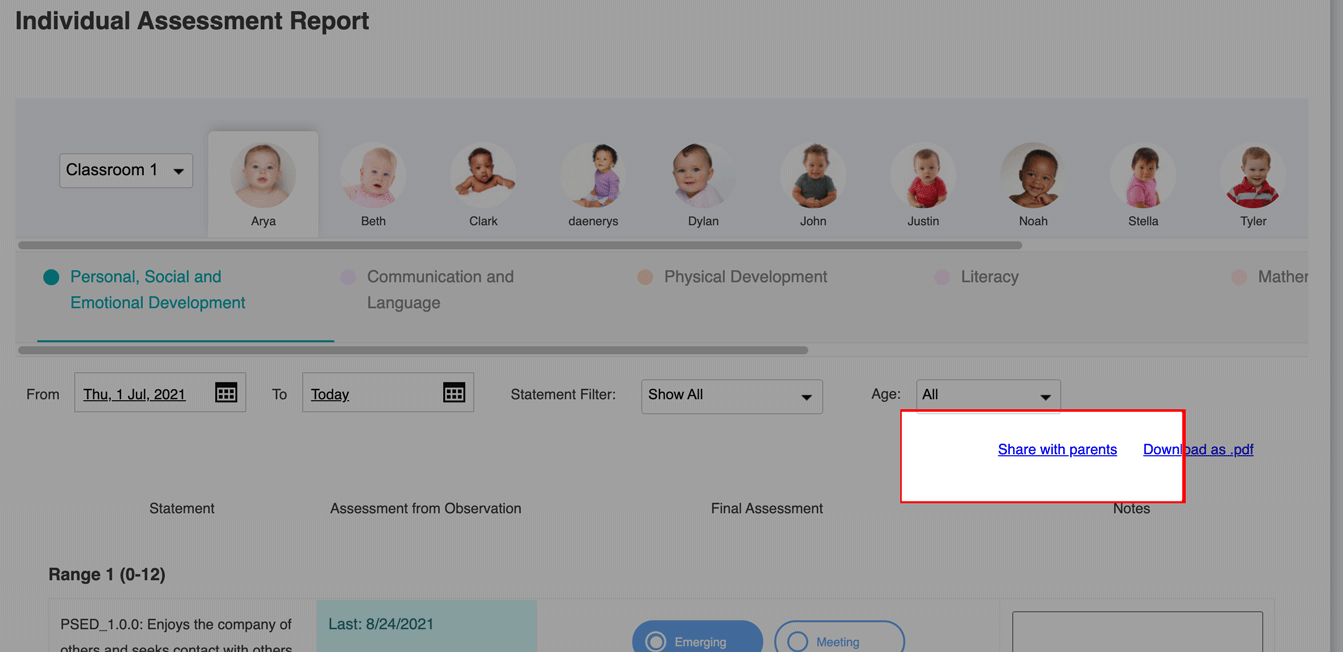
You can now easily share an individual assessment report to parents by clicking on the ‘Share with parents’ link in the Individual Assessment Report page, as highlighted in the image below.

When you select this option, a PDF file of the assessment report will be saved on the child’s timeline to be easily accessible by parents via the application. Teachers and administrators can also download the PDF file of the report for archive, or to send via email to families.

Before you generate the report, the app will also allow you to enter a specific message that will be included in the report. You can use this section to add personal comments highlighting the progress that the child has made during the period. 

Monthly Observation Reports

A new report shows the list of all observations saved for a classroom or a child during the month. 

Directors and administrators can use this feature to easily view the observations shared by each teacher in their classroom, and it’s also possible to easily edit any entries. 

The report can be accessed via the Settings > Assessment Reports > List Observation page.

Support for 2021 Early Years Foundation Stage Standards (UK Only)

The Daily Connect App already supports learning frameworks and state standards for many US States, as well as countries including England, Scotland, and Australia. All told, the Daily Connect platform supports more than 50 learning frameworks and state standards. 

In response to new laws in the UK, we’ve now added support for the 2021 Early Years Foundation Stage (EYFS) Standards from the UK. Childcare centers and nurseries can record observations and assessments for children in accordance with the ‘Birth to 5 Matters’ framework, and there are several new reports specific to the EYFS framework available for administrators to use. 

For more detailed information, read our blog post on the new EYFS framework: Support for the Early Years Foundation Stage (EYFS) and Birth to 5 Matters Framework in Daily Connect

4. Parent Billing

Last month, we launched a suite of new parent billing features on the Daily Connect platform. Some of the key features include:

  • Customizable invoices
  • Online and offline payment options
  • Auto billing and recurring payments
  • Online dashboard
  • And more

The parent billing features have now been enabled for all accounts with more than 5 children actively enrolled. Interested in learning more? Read our blog post announcing the parent billing features in more detail, or schedule a demo to learn more about how your childcare center can start using Daily Connect to bill parents today. 

What Other Features Would Make Your Life Easier?

Many of our most popular features start with requests from Daily Connect users like you. 

If you’ve got an idea for a new feature that would make a big difference in your day to day work, reach out to the team and let us know. You can email us at support@dailyconnect.com. We look forward to hearing your ideas!

Support for the Early Years Foundation Stage (EYFS) and Birth to 5 Matters Framework in Daily Connect

If you work in the childcare industry in the UK, you’re likely aware of the Early Years Foundation Stage (EYSF) and Birth to 5 Matters framework. The Birth to 5 Matters framework is a non-statutory framework that serves as optional guidance to support childcare practitioners as they implement the statutory requirements of the EYFS in their childcare business. 

Produced by the Early Years Coalition, the Birth to 5 Matters framework takes the latest research in child development into account to provide childcare centers guidance as they support children’s progress in their early years. By following the framework, childcare professionals can ensure that all children in their care progress towards all of the statutory learning goals outlined in EYFS. 

At Daily Connect, we’re excited to announce that we’ve added support for the Birth to 5 Matters framework in the Daily Connect App, making it significantly easier for teachers and administrators to track children’s progress towards various developmental milestones

Our goal is to support practitioners in the fundamentals of observing, planning and assessing children to support and share their growth. With that in mind, we’ve made several updates to the Daily Connect app to best support our users in the United Kingdom. 

You can try them out for yourself by selecting the Birth to 5 Matters framework in your Daily Connect app, but for now, here is an overview of some of the key features:

Save Observations for Each Child

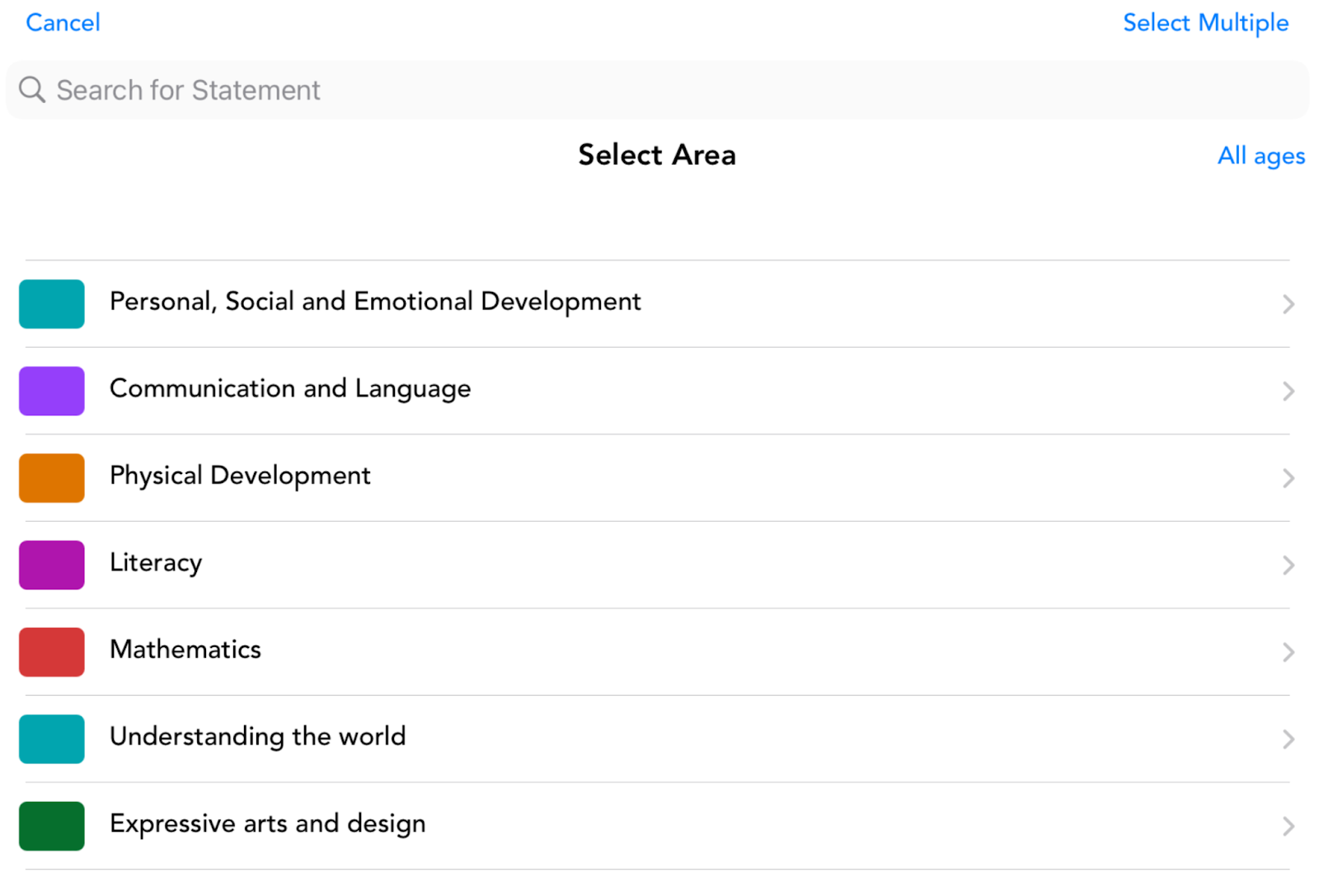
Teachers are able to save observations for each child and choose both an assessment (Emerging/Meeting/Exceeding) and a Range for each selected statement. For teachers, this allows easy saving of information and observations in the classroom, and eliminates the need to track evidence from previously used frameworks. 

An overview of the different areas and statements supported is shown below:

Reporting Features 

We’ve also added a range of new reports specially designed to help daycare staff and administrators track the progress of children against the Birth to 5 Matters framework. 

These reports can be used to track the development progress of children internally, but they also serve as a valuable resource for the EYFS reporting requirements. You can also use them to have higher quality conversations with families about the development of their children, and ensure a more joined up approach to development between home and daycare. 

There are three key reports available:

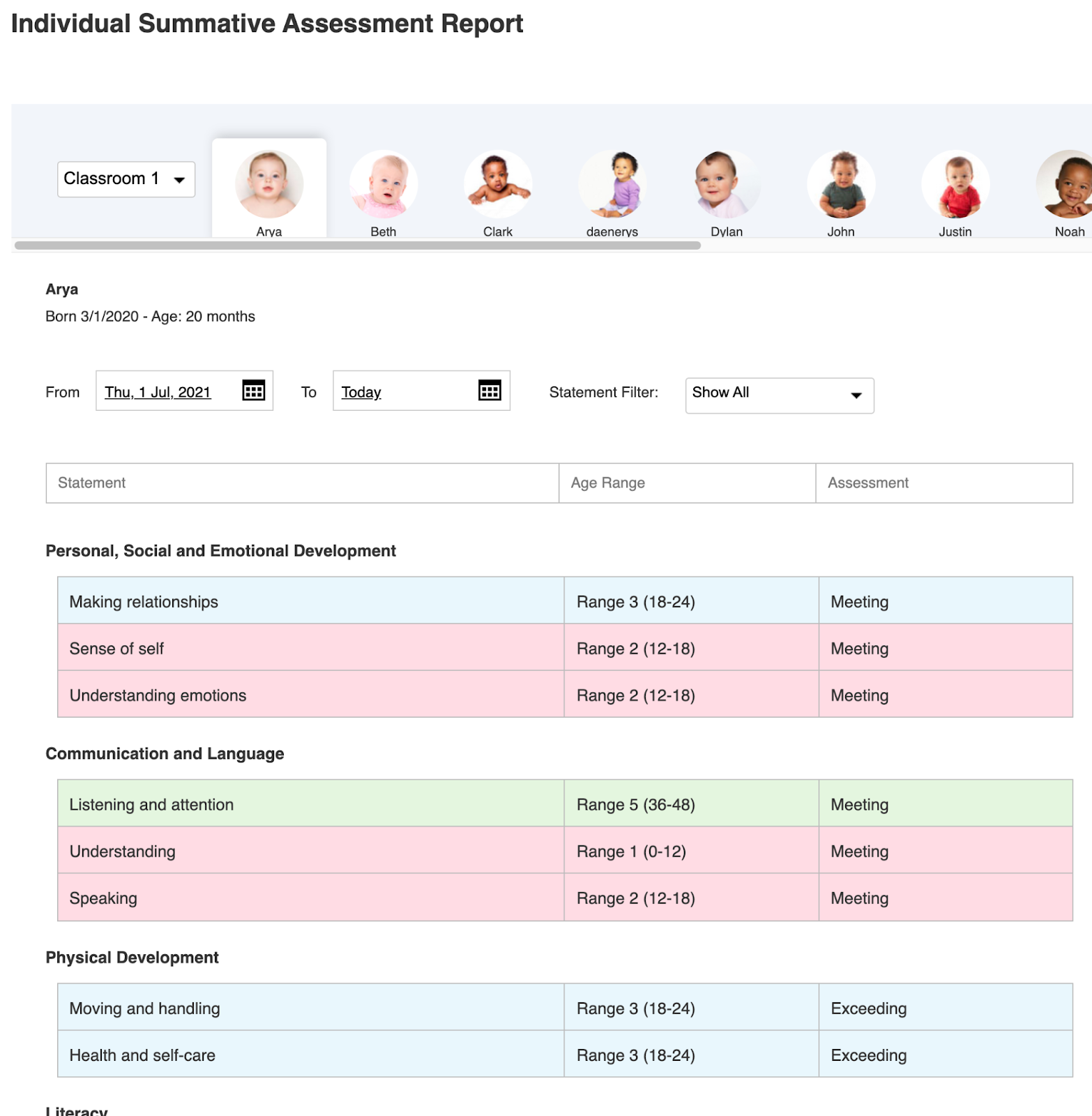
#1 The Individual Summative Assessment Report

This report shows the range and assessment for each statement that makes up the Birth to 5 Matters framework. It’s personalized to each individual child, and is colour coded to provide a quick and easy way for teachers, administrators, and parents to track and identify development areas for each child:

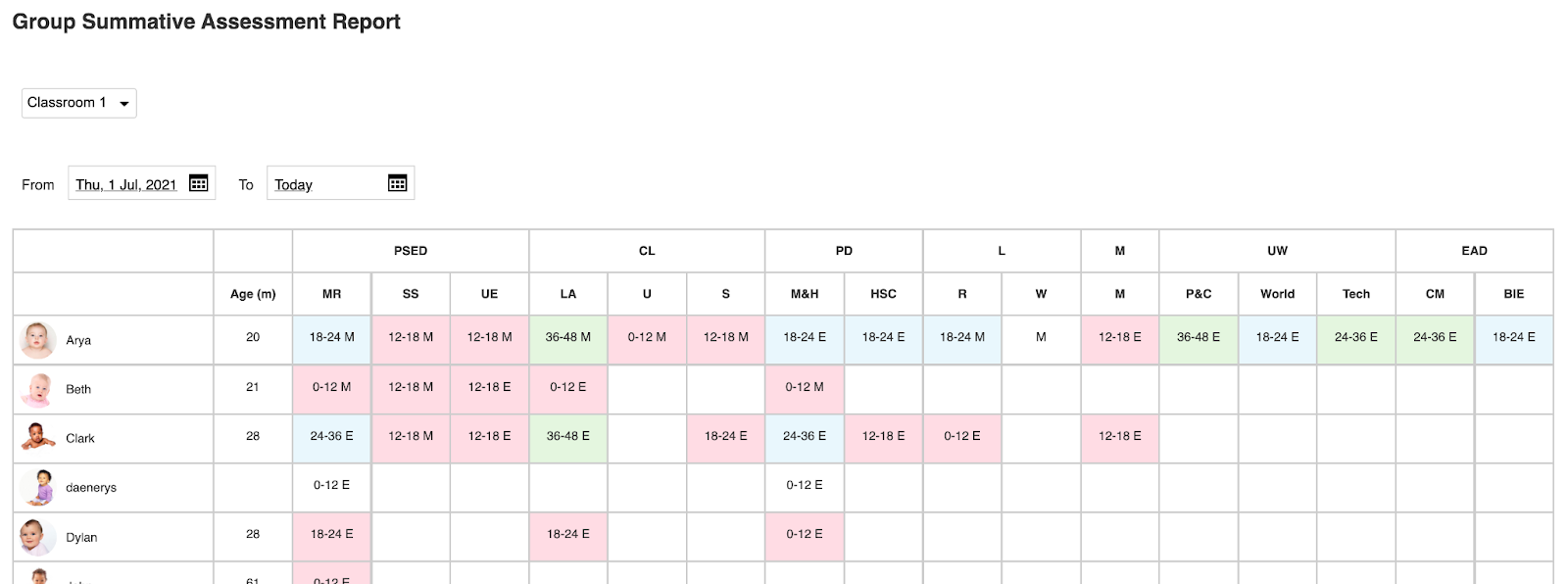
#2 The Group Summative Assessment

This report summarizes each child’s individual summative assessment report into an overall view that allows teachers and administrators to quickly view the information for every child in a classroom at once. 

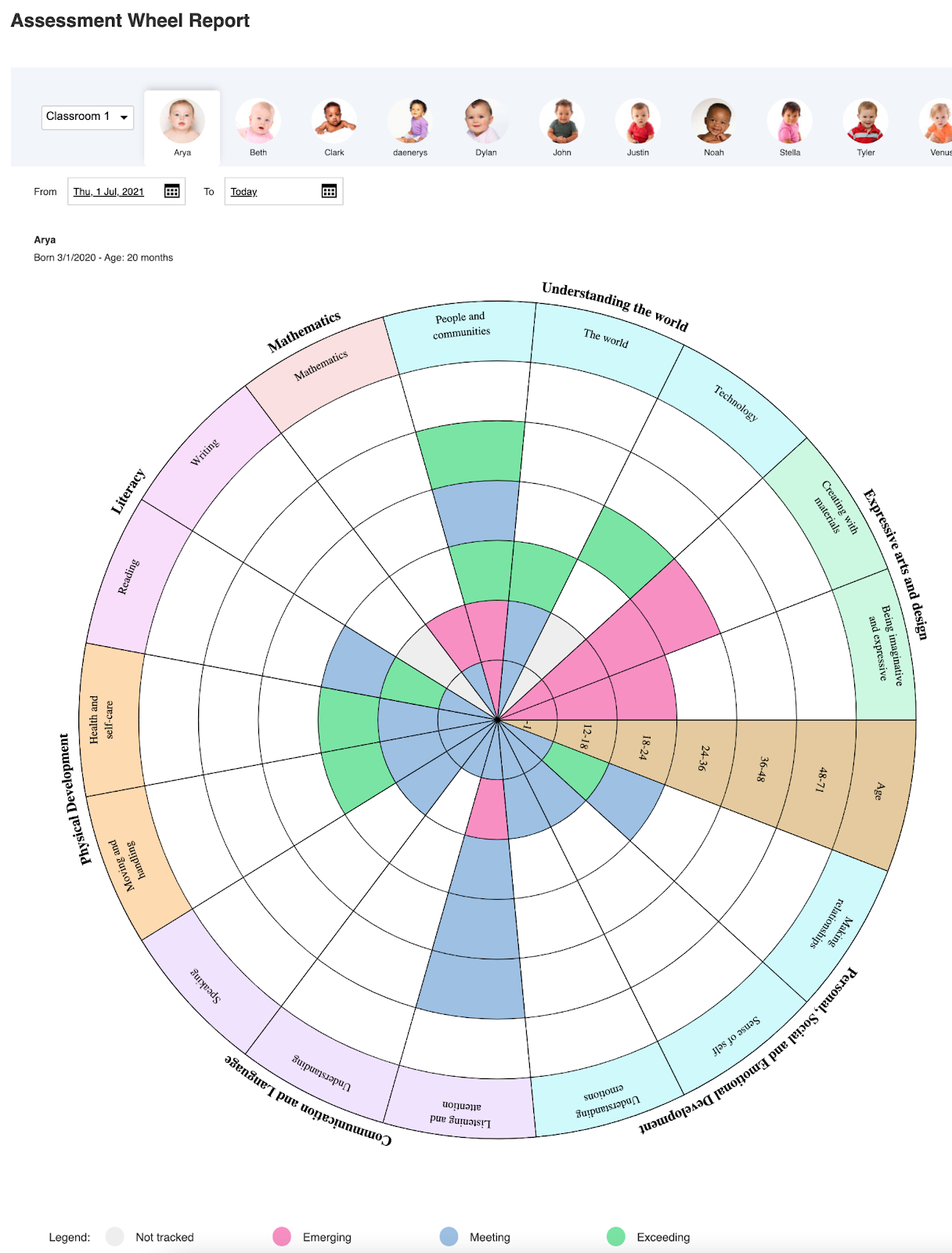
#3 Assessment Wheel Report

The Assessment Wheel Report provides a holistic view of each child’s development in every area of the Birth to 5 Matters framework. This report makes it simple for teachers, administrators, and parents to get an overall picture of every child’s development against all important milestones. 

Other Learning Framework Reports

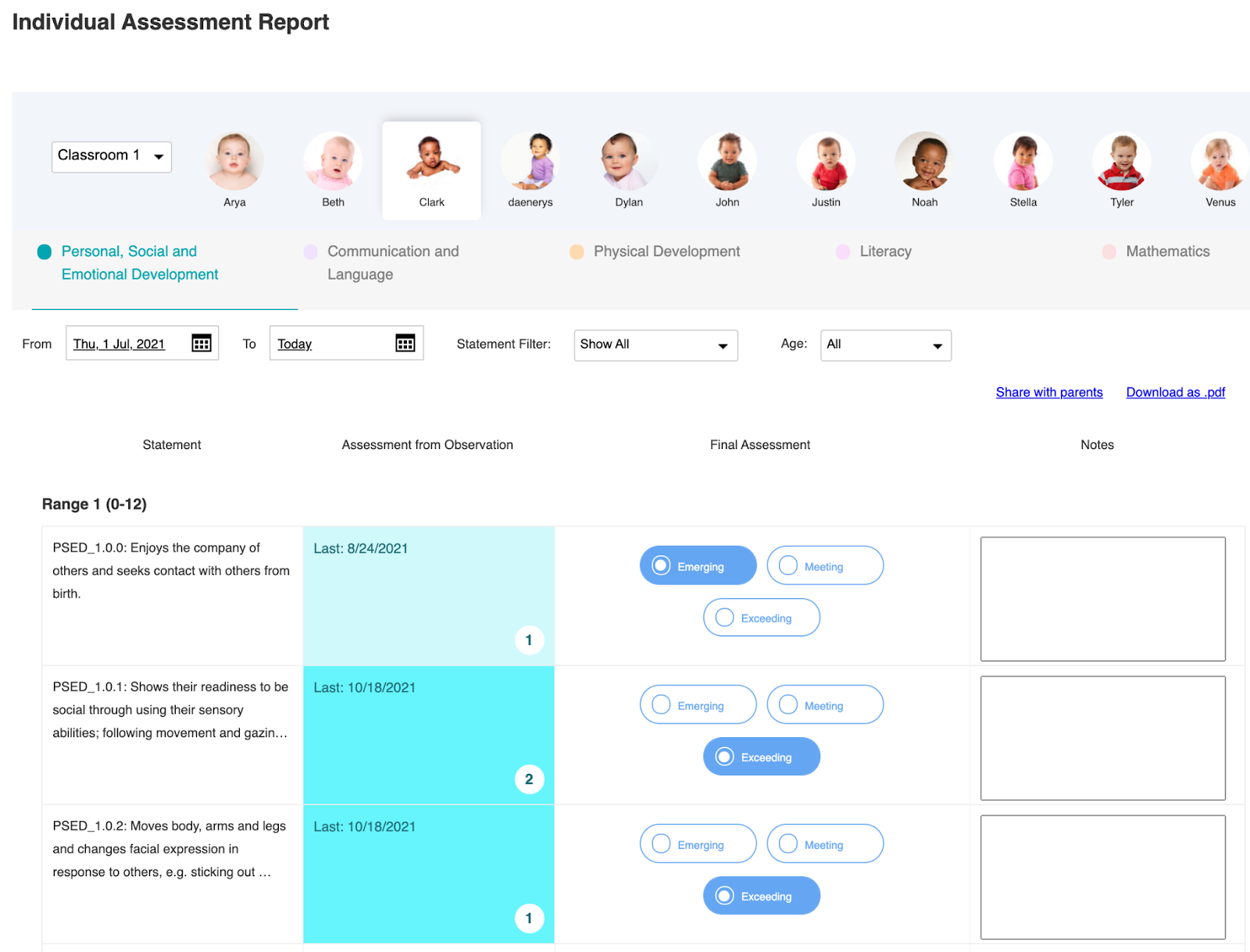
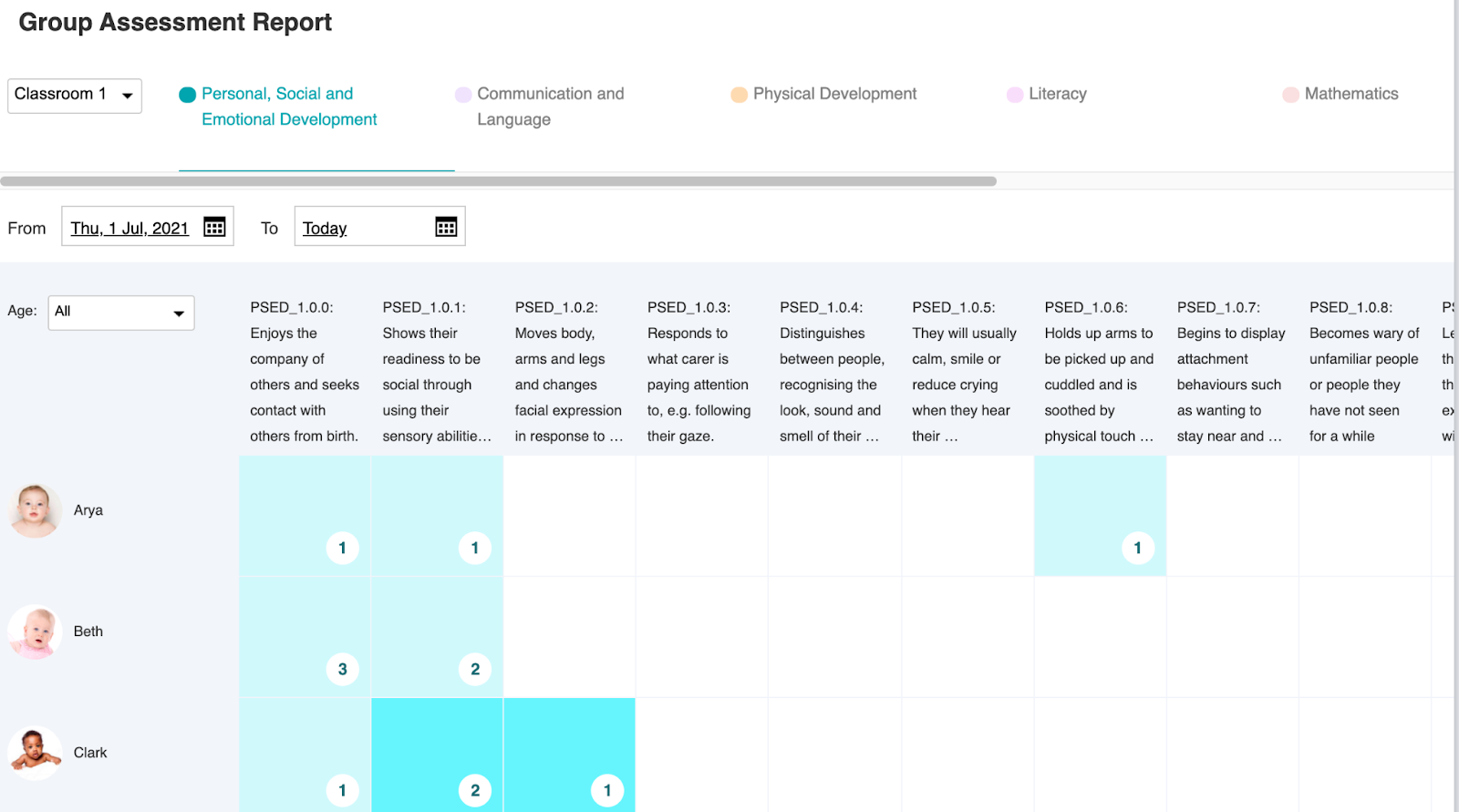
All of the reports and features detailed above are available in addition to the existing reporting features available in Daily Connect for all learning frameworks. These reports make it easy for teachers and administrators to easily view assessment levels for each statement, quickly view the number of observations and the date of the last recorded assessment, and easily enter new assessments.

Here is an overview of the key learning framework reports:

Individual Assessment Report

Group Assessment Report

We’re confident that these new features will help childcare centers, nurseries, and playgroups across the United Kingdom as they adapt to the Birth to 5 Matters Framework and EYFS. We’re excited to support childcare providers in England, Scotland, Wales, and Northern Ireland as they make these changes and commit to delivering a high quality of childcare for the families they work with. 

Interested in learning more about Daily Connect’s support for a variety of learning frameworks and state standards? Visit the Learning & Assessment section on our website, or start a free trial of Daily Connect to try it out for yourself

How to Start a Childcare Business

Every city, town, and village needs childcare centers. They’re crucial parts of local communities, enabling parents to work and creating healthy, happy experiences for kids to learn and bond with others. If you’re thinking about how to start a childcare business, there are several things you should be aware of.

In this article, we’ll cover everything you need to know to start a childcare business that lasts.

Choose a Location

The first thing you need to decide when considering how to start a childcare business is whether it’s going to be an at-home center or a daycare facility.

Many small but mighty childcare businesses are run by one professional in their home. It’s a flexible option where even your own young children can be present with you while you run the childcare business. However, the cost of this startup can be difficult without ample preparation or support. You need the right amount of space dedicated to the daily activities of your business, meaning a smaller living situation isn’t ideal. 

Running a childcare center at a facility can be easier if you have enough money to rent or buy a dedicated space. Renting out a childcare space is convenient, as you get the entire space to run your business. But if you’re committed to operating a facility, there are often more regulations you need to follow.

Learn the Regulations and Get Licensed 

One of the most crucial parts of starting a childcare business is obtaining the right licenses and abiding by regulations. It’s wise to get yourself covered early so you don’t run into any conflict with the law and so you can start operating your business smoothly.

Look into everything you need at a federal and state level. Some cities and counties have different regulations you’ll need to be aware of, too. Do your research and contact local education boards to find out exactly what you need to get legitimately licensed.

Establish Your Finances 

Get clear on the financial requirements of your new childcare business before getting too far into launching into the business. Create a forecast that makes clear how many children you’ll need to enroll, and at what prices. This means knowing your budget, the cost of any overheads you’ll have, and any fees due for licensing. It should also include clear financial goals so you can work your way up toward success in your business.

Learn how to create a childcare center business plan which will help you have a clear direction in your business, especially for the first several years. If you need assistance with the finances during startup, look into government grants and tax credits available to you.  

Set Up Bookkeeping and Accounting

Along with getting clear on the financial details of your business, you need to plan what type of bookkeeping you’ll use. This includes the details of:

  • Enrollment and tuition costs
  • Financial tracking
  • Parent billing
  • Childcare software 
  • Tax details
  • Organizing write-offs and school supplies

If you set good accounting practices in place before your business gets up and running, it will make it much easier for you long-term. Don’t try to do it alone — consider investing in a digital platform geared specifically for childcare providers. This will save you a lot of time, money, and energy for years to come.

Create the Curriculum

What’s a childcare center without a curriculum? Come up with the learning plan for your daycare center. Tie in your childcare center’s core philosophy and modes of operation in your schedules and methods. 

Consult the Early Childhood Education (ECE) standards in your state and implement a balance of play, hands-on learning, and structured lessons daily. Make it unique— your childcare center stands out somehow, so include it in your teaching model.

Hire Staff to Join Your Team

If you’re planning to run a childcare business with the help of others, you’ll need to think about your hiring process. Here are some key questions to consider when getting ready to hire employees for your team:

  • What qualifications are you looking for?
  • What are the childcare center’s values, principles, and philosophies?
  • What level of experience do you expect each staff member to have before hire?
  • What curriculum will you direct the teachers and staff to implement?
  • What will you include in the employee handbook?
  • How will staff communicate with each other on-site during work hours?
  • What will be the clear expectations for each level of staff?
  • How will the onboarding process work?

Every childcare center is different, so choosing employees that reflect the standards of your business is essential.

Marketing and Promotion

You’ll need a strategic marketing plan to ensure that families can easily find you and enroll their kids in your new daycare center. It’s helpful to have an online presence, whether with a custom website, social media accounts, or online listings on sites like Angie’s List or Care.com.

Know which demographic you serve in the area your childcare center will be in. Target your marketing plan toward the niche you serve and you’ll have better luck converting leads into sign-ups. Leverage local outreach opportunities, such as public bulletins, family planning centers, neighborhood parks, and local babysitting services.

Write Your Policies and Contracts

When it’s time to finally set your business in stone, finalizing it beyond licensure is a milestone worth celebrating. Create your school’s policies, guidelines, and contacts for:

  • Parent and teacher agreements 
  • Health and safety standards
  • Food and allergy protocols
  • Staff files
  • Legal documentation
  • Emergency plans
  • Field trip liabilities
  • And more

If you need help, hiring a lawyer might be a good idea so you can make sure all your bases are covered and nothing is left out. 

Invest in a Childcare Software

When you’re finally welcoming kids to your new childcare center, run your business smoothly by using a childcare management software. These digital tools help you organize your business in every way possible. 

From payment processing to ongoing parental communication, childcare software apps like Daily Connect provide you with the streamlined processes you need to run your business. 

Features of childcare software include: 

  • Shared event calendars
  • Parent-teacher communication 
  • Center-wide communication tools
  • Health and COVID-19 protocols 
  • Staff communication and attendance tracking
  • Contactless sign-in and sign-out
  • Billing and payment management
  • Documentation and authorization file management
  • Learning and assessment tools
  • And more

If you’re starting a childcare center, the process can seem overwhelming. Having all the tools you need in one versatile platform gives you quick and easy access to the most important information you can always refer back to. 

Whether you’re just beginning to think about how to start a childcare business or you’re learning how to improve your new daycare business for long-term success, contact Daily Connect today to see how our platform can guide your everyday operation. 

The 6 Key Elements of a Childcare Center Business Plan

Running a successful childcare business takes work. So much of your care, time, energy, and financial resources goes into making it operate at its best. But things can become scattered and confusing when there isn’t a solid childcare center business plan set into place. What exactly is a business plan, and how can childcare providers use one? If you’re looking to put your childcare center on the right track, here are the best childcare business plan strategies you should follow.

Why You Need a Daycare Business Plan

Having a business plan gives you the foundation you need to build your business. Ideally, before starting a business you have a thorough guide detailing everything you should expect. It includes your startup budget, success markers, legal requirements, employee processes, marketing strategies, and more. 

What Your Childcare Center Business Plan Should Include

Creating a business plan isn’t an easy (or quick) process, but it’s a must if you want to make your vision a reality. Even if you’re already in business but simply want to improve, coming up with a new plan can be helpful to reach future goals. 

1. Mission and Goals 

Start with why you’re running a childcare center in the first place. Who do you hope to help? What impact do you want your school to have? What’s your larger vision? Establishing specific goals will give you direction when making important decisions. 

When it comes to goals, here are some necessary subcategories to get clear on:

  • Unique Mission Statement – the best brands have a strong mission that reflects throughout their entire business. Form a unique, clear mission statement that’s specific to your daycare. What sets you apart? Why do you do what you do?
  • Location – location will determine how you approach your business model. If you’re in an area that’s considered a childcare desert (little to no daycare available), you’ll have an easier time setting up your business than a location that already has a thriving population of childcare providers. Make sure you scope out the competition.
  • Type of Daycare – is your daycare an at-home center, a facility, or affiliated to a private or religious organization? Is there a gap in your local market for a childcare center like yours?
  • Success Markers – what are the indicators of success in your daycare? How many students need to be enrolled to be at maximum capacity? How much money does your business need to make before it can expand?
  • Budget – starting a business isn’t cheap. If you’re considering starting a daycare, get clear on your budget. This includes rent/mortgage, utilities, payroll, supplies, licensing fees, tuition, and more. 

2. Operational Policies

Childcare is a regulated industry, and all childcare centers have to abide by policies set by local regulators and governments. Policies keep your childcare center safe and in good standing, and also help ensure trust between you and the families you’ll potentially provide care for. Failing to define and abide by a clear set operational policies can ruin your business, so make sure you’ve thought through the details and are aware of what’s required.

Policy requirements vary by state and county. Here are the main types of operational areas you should focus on:

  • Health, Safety, and Sanitation – to operate a daycare, you need to follow health and safety guidelines. Make sure you, and your staff, are well aware of all the legal regulations and site-specific protocols your center will follow.
  • Worker’s Comp – if you or a staff member gets injured on the job, having a worker’s compensation plan can save your business a lot of money and legal trouble.
  • Liability Insurance – insurance protects and helps cover your childcare business from disastrous accidents. 
  • Crisis Plan – what are your action plans if there’s ever a crisis or natural disaster during daycare hours?

3. Teacher and Employee Responsibilities

If you’re relying on staff members to help run your business, it’s vital to create clear expectations to encourage professionalism. 

At a minimum, plan these factors of employee responsibility:

  • Accreditation – what credentials do your teachers and employees need to have to work for you? 
  • Hiring Process – structure the hiring (and lay-off) process to meet legal requirements. Make sure the people you hire fit into the mission of your childcare center. 
  • Curriculum & Activities – how and when will staff members need to plan (or deliver) the necessary curriculum? What activities will happen on a weekly and daily basis? How will you track learning and assessment?
  • Staff Communication – there need to be defined methods of communication between all staff members. Utilizing technology will help lower the risk of error. 

4. Tuition and Payment Methods

It’s important to understand how your childcare center will make money. How will families pay for your daycare center? What will your tuition fees be? Know the financial requirements your childcare center needs to keep running (and thriving). You should consider:

  • Cost of Each Child – tuition costs should be factored into your overall budget and annual financial goals. This is what determines how much it costs for each child to attend your daycare. Many childcare centers have plans that parents can choose from.
  • Electronic Payment Methods – these days, it’s rare for adults to carry cash or check on hand. Setting up online parent billing will encourage on-time payments, easier billing, and better tracking of funds throughout your business. 
  • Additional Fees – clarify any fees that need to be paid by parents, such as late fees, onboarding fees, or special activity fees.

5. Parent Communication Strategy

Communication between parents and teachers is one of the most important aspects of running a great daycare. How you communicate with parents says a lot about the character of your staff and the priorities of the business.

Here are some key things to consider when improving parent-teacher communication:

  • Scheduling – do parents have a way to view their childcare schedule? Everyone’s busy, so it’s beneficial to provide some sort of digital calendar to help them stay on track.
  • Academic Reports – if you can provide announcements, updates, and milestones for a child’s academic progress, parents will feel confident they’re getting what they’re paying for. 
  • Daily Communication – having a way to consistently relay information to parents throughout the day is important. Consider using a childcare management platform with parent communication features
  • Digital Contact – beyond verbal communication, parents who receive real-time updates while they’re away from their child get the feeling of being present for their child’s special moments.

6. Marketing Plan

Effectively marketing your childcare center can help skyrocket growth and boost your reputation with local families. Most business plans pay a significant amount of attention to marketing strategy. Here are the key three things to map out:

  • Marketing Methods – how will you market your business? Will you focus on digital marketing, word of mouth referrals, or traditional means through newspapers and local ads?
  • Online Reputation Management (ORM) – maintaining your reputation online and in-person can take time, but with the right marketing plan, it can position you as an authority in childcare. 
  • Advertising – paying to display ads online can help target your ideal audience. By calculating your ad spend or hiring a marketing team, you can bring in the families who are looking for a childcare center like yours.

Tools for a Successful Childcare Center Business Plan

Whether you’re thinking of opening a new daycare center or already running an established facility, knowing your business plan inside and out will help you achieve your goals and guide you as you grow your business.

You can even streamline this process with childcare-savvy digital tools that can enhance your business plan. Apps like Daily Connect give you access to all systems and strategies you need when planning and running your childcare business. 

With customizable online learning tools, parent-teacher messaging, childcare center management, and parent billing features, Daily Connect helps childcare businesses run smoother than ever. Get a free trial today, or contact the team for a step-by-step demo of how Daily Connect can improve your business for years to come. 

NEW: Parent Billing on Daily Connect

We’re excited to announce the launch of all-new Parent Billing features on the Daily Connect App. 

This has been one of our most requested features ever, and we’re proud to now offer a full suite of billing and payment solutions to the thousands of childcare centers and daycare facilities that rely on Daily Connect every day. 

The Parent Billing platform is found within your existing Daily Connect account, and it’s easy to use, with a simple online interface that helps childcare administrators ensure they get paid on-time, every time. 

Let’s explore the key features:

Customizable Invoices

When you’re running a business, it’s important that everything looks just right. That’s why with Daily Connect’s new Parent Billing features, you can add your childcare center’s name, branding, and logo to your invoices. 

But customization doesn’t stop with appearances. Customize your billing cycle to match your business, and add payments for tuition, meal plans, after-care, onboarding fees, field trips, and more. Whatever you need to charge parents for, Daily Connect has you covered. 

Online & Offline Payment Options

When you email parents an invoice, it’s up to you how you accept payments. And with Daily Connect, there’s plenty of options. You can accept credit cards, debit cards, ACH transfers, cash, or check, and record everything in the Daily Connect app. Parents can pay online in just a few clicks, direct from a link in your invoices, making it easier than ever for you to accept payments. 

All online payments are quickly routed to your bank account by our banking partners, and you can record any offline transactions with just a couple of clicks. 

With low, flat-rate payment processing fees, you can do business on your terms:

  • Credit Cards: 2.9% Fee. For example, on a $100 payment, the fee would be $2.90.
  • ACH Transfers: $1.25 per payment. 
  • Cash/Check: No fees. 

Auto Billing & Recurring Payments

Put your parent billing cycle on autopilot with auto billing and recurring payments. You can create weekly or monthly recurring invoices that send automatically to parents. Parents receive reminder emails for unpaid invoices, and it’s easy for administrators to view and follow up on any overdue invoices.

Parents can schedule payments, securely store their card on file for convenience, and access their billing records and receipts. 

Online Dashboard

Track all your payments in one place with a simple online dashboard that’s part of your existing Daily Connect account. You can view reports on revenue, fee payments, and overdue invoices, and view charts that show how your business is growing over time. 

Activate Parent Billing in your Daily Connect Account Today

The ability to invoice parents, accept online payments, and track revenue all in one simple online platform is a game changer for childcare providers. By automating all this time-consuming administrative work, you can free up more time to spend growing your business, safe in the knowledge that you’ll be sure to get paid. 

If you have an existing Daily Connect account with more than 10 children enrolled, there are no additional charges to create and send invoices, view reports, and accept payments offline, and your monthly payment will not change. You’ll only be charged payment processing fees when you allow parents to pay online. 

Interested in learning more? Visit the Parent Billing webpage, or schedule a demo with one of our Product Experts to get a tour. 

7 Tips to Run a Successful Daycare Business

Childcare is more than supervising and nurturing kids while their parents are at work. Childcare is also a business— a necessary, legitimate, and impactful one. To run a successful daycare business you need a good work ethic, a heart for children, and a smooth business model you and your staff can follow. 

When all the professional details are met, you can focus on serving the children and families at your daycare. In this guide, you’ll learn the top seven tips to both start a daycare and run your childcare center successfully.

1. Follow the Policies

Every childcare center is required to follow a set of policies. Policies include federal and state licensure, health regulations, financial agreements, and more. While there are certain policies that all daycare centers must follow, some of them vary depending on size and location.

Some daycare centers have specific policies unique to their facility. For example, you may have tuition fees, a schedule, and nutritional standards that look different than other local childcare centers. Maybe you have a curriculum that is different from others.

Set up your policies to be followed clearly. Make sure your daycare center strictly follows all of its policies! This will prevent lawsuits, avoid confusion, and allow your center to maintain a good reputation in the community.

2. Build Healthy Relationships

Parents send their children to daycare to enrich their development and encourage them to form bonds. An excellent daycare center is led by the understanding of what it takes to create healthy relationships.

Communication with the kids in your care is a vital part of childcare. Additionally, parents expect clear, professional, and friendly communication on a regular basis. Talking about their child’s behavior, discussing money, and resolving conflict are all natural parts of this industry. 

These days, some tools can help daycare workers build better relationships. While in-person communication is still ideal, digital communication can benefit the ongoing contact between parents and staff. 

3. Make Life Easier for Your Team

Another key to a successful daycare business is making sure your team is supported. It isn’t always easy working with children all day— emotions run high, accidents happen, and chaos can ensue. By giving your employees the help and expectations they need, you can all be successful together, even on difficult days.

To make life easier for your staff, you can:

  • Provide ongoing training and employee education 
  • Set up easier communication tools between classrooms
  • Hold monthly meetings where your staff can discuss and voice their feedback
  • Maintain a leader gratitude board
  • Upgrade routine administration tasks to electronic software
  • Remain open to the questions, concerns, and suggestions of your staff

4. Grow Your Daycare Enrollment

The more enrollment opportunities you have, the easier it is to run a successful daycare business. One of the biggest challenges daycare centers face is growing their enrollment. 

Encouraging new enrollment takes time and effort. By becoming more involved in your community, you can promote your business, help parents find your daycare online, and truly stand out from the other childcare centers in your area.

With the internet today, it’s easier than ever to promote your business online. Having a useful website people can visit builds trust from potential enrollees. Providing a virtual tour of your facility can make parents fall in love with your daycare at first sight. Partnering with local advertising agencies can help put you in front of the right audience.

To learn more about specific ways to grow leads for your daycare business, read this Free Guide to Increasing Enrollment.

5. Improve Childcare Billing and Payment

There is always room for improvement when it comes to receiving payments in your business. If you’re still running on checks, cash, or inconsistent credit card payments at your daycare, it’s time for an upgrade that will make your life a lot easier.

You can update your billing systems by going digital. If you’ve already gone digital but still struggle to keep up with the financial aspect of your business, there are payment processing tools designed specifically for you.

Switching to a childcare payment app helps daycare providers stay on top of their billing and tuition. That way, more time and energy can be spent on what really matters: caring for the kids.

6. Market Your Daycare Business

Marketing is relevant for all businesses today, even childcare. Because 90% of adults use the internet to find information relevant to them, a majority of parents are turning to search engines to find childcare services. 

If you can improve your website with local SEO (Search Engine Optimization), you can show up as one of the first results in your area whenever people search for daycare. Being active on social media can boost your credibility. Advertising on childcare resource sites can also connect you with parents who need care for their children. 

7. Hire the Right Staff Members

Who you hire to work for you can contribute to your daycare business’ success. You don’t want to hire someone with no experience, but you also don’t want to turn every imperfect candidate away. 

Seek qualities in employees that you see potential in. Even if someone doesn’t have the exact schooling units you’d prefer, maybe they have an awesome personality and real-world experience working in care situations that would benefit your business. 

Since several other ways to ensure success involve supporting and communicating with your staff members, hiring the right people will overflow into the other areas where trainability and attitude simply cannot be taught. 

Helping Your Daycare Business Succeed with Daily Connect

If you’re still wondering how you can run a successful daycare business, get organized with a childcare center app. At Daily Connect, we help daycare providers just like you get the services and administrative support they need to boost their business to the next level. 

With Daily Connect, you receive: 

  • Childcare Center Management Tools
  • Sign In and Attendance Options
  • Parent Communication Tools
  • Assessment Records and Digital Portfolios
  • COVID-19 and Health Safety Reports
  • And more

With digital tools and smart practices like these, you can improve the everyday demands of your childcare center. Get the help you need to finally grow your daycare business. Reach out and get a free demo of Daily Connect today. 

5 Essential Childcare Business Tools You Need

Every childcare business has its own set of operational needs. To run your childcare center effectively, there are systems and procedures that must be followed with careful attention. Sometimes, these systems require changes to adapt to significant growth or necessary shifts in the childcare industry. To be successful, you need to embrace childcare business tools.

To maintain the best possible procedures and routines within your childcare business, here are five tools you don’t want to operate without.

1. An Established Online Presence

These days, everyone uses the web when making decisions. Whether it be shopping for a new product, comparing the best services in the area, or scoping out new schools in the community, parents are especially internet-savvy when it comes to selecting what’s best for their child.

Where families send their children for childcare is not something they take lightly. They want to know what your program is about, who works there, and which curriculum standards your school is abiding by. Having an up-to-date, accessible online presence as a childcare provider is key to winning that positive first impression.

If your childcare center has a website, make sure it’s user-friendly and displays an accurate representation of your facility. In addition, posting regularly on social media can boost the validity of your brand because it shows that there are real humans who value communication with their community beyond the nine to five work hours. 

Keeping your childcare business active online is a great practice. It benefits your business in several ways, including: 

  • Captures the attention of local families interested in finding childcare
  • Shows that you value online communication with parents 
  • Proves your business is modern, relevant, and reliable 
  • Showcases the key features of your location, including pictures and amenities 
  • Shares updates, announcements, and special events people need to know about
  • Helps people find you online, with proper SEO and quality content on your site

The first step to attracting success within your childcare business is to get online. When a school or daycare doesn’t have a website set up, parents will be less likely to inquire about enrolling their child. 

2. Classroom Management Tools

Classroom management tools ensure your teachers can run their classroom smoothly, spending less time on paperwork and more quality time with the children. The most important features of any classroom management tools include attendance tracking, curriculum management, and incident reporting. 

These tools are usually software platforms that teachers and administrators can access from their computers, tablets, and even smartphones. They make it easy for teachers and administrators to quickly record observations, take attendance, and keep records. Before these tools became popular, teachers would have to record everything manually on paper, wasting time and money.

Some of the ways childcare centers can use classroom management tools include:

  • Taking attendance
  • Keeping track of teacher:child ratios in every classroom
  • Recording observations against learning frameworks
  • Planning lessons from pre-selected curriculums
  • Maintaining records required by local regulators
  • Recording minor accidents and incidents

3. Seamless Parent-Teacher Communication

When parents enroll their kids in your program, they expect clear, consistent communication. They want to know what their child is doing at your center, how their child is behaving, and what happens throughout the day and week. 

Gone are the days when parents would be in the dark about how their kids’ day is going. Now that smartphones are in nearly every parent’s pocket, direct messages and emails can swiftly deliver updates and important alerts.

There are apps that fulfill ongoing communication needs between childcare staff and parents. Send out instant notifications to guardians and let them know what is happening throughout the day in real-time. Deliver injury and incident reports as they happen. Ease the stress of a mom with a child with sleep regression by notifying her there was a quality nap today. 

Parent communication apps for childcare help both providers and guardians. These tools increase communication by:

  • Allowing instant, automatic updates throughout the day 
  • Tracking and recording important information
  • Notifying parents of special moments and achievements, not just concerns or issues
  • Confirming guest pickups (for example, if a grandparent is picking up a child)

4. Simple Payment Processing and Accounting

One of the challenges technology solves in childcare centers is the process of receiving and tracking payments. Without digital tools, it can be extremely difficult to keep up with accounting and bookkeeping. 

There are a large number of children and families to account for. Tracking enrollment, late fees, event payments, and more is simply not feasible without the right processing software. This is especially true if you’re operating a larger, more well-established childcare facility. If that’s the case, making sure you have everything you need in one place makes the world of a difference. 

Online accounting software helps your childcare business in many ways, including:

  • Organizing monthly or annual enrollment status for each child
  • Easy access to financial information and receipts for parents and staff
  • Tracking the overall funds of your childcare center
  • Legitimizing your bookkeeping for legal and tax purposes
  • Saving time and money all year long 

Get your childcare business on the right track with online accounting. It’ll save everyone the headache of missing payments, losing receipts, and forgetting which family paid for enrollment. 

5. Multi-Functional Childcare Center Management Software

Get the best of the best childcare business tools with childcare management software throughout your business. There are tools that deliver all of the above functions and more in a program-specific way, created specifically for childcare providers. 

Management software for childcare centers makes it easier to run your business. It helps your staff get on the same page and complete tasks, encourages parent-teacher communication, tracks important documents and compliances, and allows multimedia resources for everyone involved in your facility. 

Extra features of childcare management software include: 

  • Fully-functional mobile app for parents and staff
  • Contactless check-in and check-out for guardians 
  • Photo and video sharing of child activities throughout the day 
  • Individual learning and assessment records 
  • Staff checklists and safety protocols for important changes, such as COVID-19 regulations 
  • Parental surveys to continually update and improve your childcare programs 
  • Automatic payment options for consistent enrollment 
  • Incident reporting with detailed diagrams and written descriptions

How to Set Up Better Childcare Business Tools

Childcare centers all around the world are implementing all the beneficial features of digital management for a reason. It makes the jobs of childcare workers easier, ensures parents have access to the features they need, and allows leaders to focus on what really matters — being present and caring for students. 

See for yourself how digital tools can encourage the growth, maintenance, and positive reputation of your childcare business. To learn more about setting up a platform that helps you build a better childcare business, schedule a free trial of Daily Connect

New Features on Daily Connect

At Daily Connect, we’re passionate about listening to our users and adding features that make life easier for childcare professionals across the world. That’s why today, we’re announcing four new features to improve the Daily Connect platform for all our users. Here are the new features:

Video Sharing: As of today, childcare professionals can now send parents videos of their children directly through the Daily Connect app. 

Surveys: We’ve also added enhancements to the survey feature within the app, with powerful new customization features that help you run your childcare center more efficiently. 

Incident Reports: We’re adding the ability to attach a body map image to incident reports, helping satisfy regulatory requirements and providing more information to parents. 

Parent/Teacher Messaging Tools: We’re making it easier for administrators to access messages between teachers and parents.

All features have now been activated for Premium+ and Professional+ subscribers. 

If you’d like to upgrade your subscription to include these features, please contact us at support@dailyconnect.com

Below, you’ll find a breakdown of each of the features, including screenshots and instructions for how you can start using them. 

With the new school year just around the corner for many childcare centers, we’re confident these features, in addition to our existing features, will give you all the tools you need to provide a memorable childcare experience.

Video Sharing

Since we launched our photo sharing feature, childcare centers across the world have shared more than 60 Million photos with parents. 

Users can now record videos of children and share them directly with parents. 

Parents view the videos of their children straight from the Daily Connect app on their phones, and will also receive any videos you share via the daily summary email. 

Videos can be up to one minute long, and are accessible in the system for one year. After that, they’ll be deleted, but an email will be sent in advance of this to give parents the opportunity to download the video to keep forever. 

The process for sharing a video is exactly the same as the process for sharing a photo. 

This feature is available on the mobile application to all Premium+ and Professional+ subscribers. 

Surveys

Previously, surveys were only available for the sign-in process. We’ve now added a number of improvements to the survey process, meaning you can use surveys in powerful new ways.

Surveys can now be sent to staff members, parents, and prospective families. Some ways you can use surveys include:

  • Sharing a staff checklist to ensure all required tasks are performed
  • Asking parents for their opinions on events, like field trips or celebrations
  • Sending a questionnaire to prospective families to learn more about them 

Everyone you send the survey to will receive an email notification, as well as an alert in the Daily Connect app. 

You can customize the survey to ask whatever questions you like, including questions with free text answers or questions with different choices. 

Users can pull customized reports with survey results, and use filters to view responses. This is helpful for applications like staff checklists, where the administrator only wants to see items marked ‘Not Done’. 

The survey feature can be accessed in the Settings > Surveys page. 

Improvements to Incident Reports: Body Maps

When an incident occurs, it’s important to record it quickly and accurately. We’ve now added body maps to incident reports so that users can better report any injuries. This helps parents to better understand what happened, and is also recommended (or even required) by your local regulator.

Parents receive incident reports via email and through the Daily Connect app, where they can sign the incident report. Administrators can then print and save the report for their records. 

Improvements to Parent/Teacher Messaging Tools: Administrator Access

We’ve made it easier for administrators to view messages sent between staff and parents. Instead of browsing through each classroom to see messages, administrators can now view all messages at once through the ‘All rooms’ menu item on the Daily Connect Web App. 

Administrators can also enable push notifications on their device to receive a notification every time a message is sent. 

We’re confident that these features will improve the Daily Connect experience for administrators, teachers, and parents alike.


If you have any questions about any of the features, or would like to upgrade to a Premium+ or Professional+ subscription so that you can access them, please contact our Support Team at support@dailyconnect.com